My Spectrum App
.png)
Redesign of the Self-Install Waiting Experience in the My Spectrum App
Company: Charter Communications
Role: Lead Product Designer for Self-Install
Digital Products Team Background:
“Spectrum's Product and Technology team creates, develops, and operates the nation's fastest mobile service, most reliable internet service, most viewed live TV app, and the most advanced WiFi, serving nearly 100 million users and 500 million devices. We are transforming the next era of connectivity and entertainment experiences.” –Spectrum
Project Initiative:
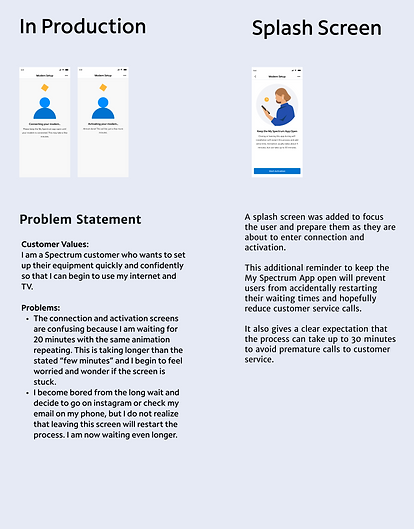
Customers self-installing internet, TV, and phone services must follow steps in the My Spectrum App to connect their equipment and wait for the app to confirm activation. The original experience was poor, lacking clear wait time expectations, progress updates, or warnings that leaving the app would restart the activation process.
Noticing similar feedback from customer satisfaction surveys, as well as fallout rates, I proposed redesigning this segment of the self-install process. The goal was to improve activation rates, reduce costly customer service calls, and build trust in Spectrum as their new telecomm provider.
Project Overview
While working on the My Spectrum mobile app, I was the lead product designer for the guided self-install experience. I focused on creating a reliable and easy to understand experience for customers who are setting up or trouble shooting their Spectrum services at home.
At the point that the customer has entered the My Spectrum app for self-install they are at a delicate moment in their customer journey which requires a supportive and encouraging interface. Customers are relying on Spectrum to confidently lead them through their home set-up and troubleshooting process so that they can access necessary services they use daily. These services are crucial for work and leisure such as internet, home phone, and TV service.
Every month approximately 175,000 distinct households attempt a self-installation in the My Spectrum App. Of those attempts, 27% fall out of the app during the connection and activation phase. This is when the customer has plugged in all of their equipment, and they are waiting for Spectrum to work their magic and connect their service.
Some of these errors are inevitable failures dictated by the software engineering endpoints; however, there are abandonments that can be caused by the customer leaving the app prematurely or errors due to their equipment not being connected correctly. The biggest drop-off is seen between the connection and activation screens which means that customers are encountering more impatience which leads them to abandon or failures during the connection phase which requires a call to customer service and they leave the app. A certain margin of error exists during the connection phase because a successful connection is reliant on 1) a working Spectrum line to the home and 2) correct set-up by the customer of their equipment (following instructions for plug-in correctly). Activation has higher success rates than connection because once a connection is established, the backend is simply detecting the connection and communicating an active status to the equipment.
I initiated a redesign of the connection and activation waiting experience with the business goal of reducing the amount of self-install abandonments, customer service calls, truck rolls, and negative customer feedback. The user experience goal is to improve the confidence and success of the customer moving through the self-install experience and by doing so, improve the customer's trust in their telecomm provider.
Digging Into the Problem
Let's View the Pre-existing Experience
Example: Modem Set-Up Flow for Internet Service
_edited.jpg)
1. Within each type of equipment set-up flow, the customer is shown an animation and written description of each step to assemble and plug-in equipment properly. They are given steps one by one and press "next" to proceed.
2. The customer waits for the app to detect a connection to their equipment.
-
The customer sees a bouncing shape animation and they are told that we are connecting their modem. They are asked to keep the app open until it's connected and told it may take a few minutes.
-
If it takes longer than 10 minutes, the app will show them a longer display message and a countdown timer of 15 minutes to let them know they need to keep waiting up to 15 minutes.
-
Once connection is achieved, the customer sees that activation is taking place which is warned to take a few minutes.
3. They receive an acknowledgement that their modem is active with a generic blue checkmark.
Initial Impressions and Hypothesis
Questions I Need to Answer as the Designer:
1. What is the average time it takes for a user to activate their equipment?
2. What does a user think when they are staring at the replaying animation for 5 or more minutes?
3. What do users do when they are waiting for their equipment to activate?
Hypothesis:
Customers whose activation takes longer than a few minutes, will leave the app to do other things on their phone and unknowingly trigger a restart to the connection/activation process. When they return to check-in on the status of their equipment, they will see the same animation playing in a loop and think the app is stuck. They will call customer service for assistance.
Customer Complaints About the Waiting Experience
The digital products team had seen a noticeable dip in the customer satisfaction score during the month of July 2022. Over 15,000 poeple provide survey feedback monthly and the satisfaction score of the self-install experience on the app dropped from 35.5 to 33. Further investigation from the voice of customer team highlighted commonly seen negative topics. One of the main complaints supports our hypothesis about issues experienced during the connection and activation phase of set-up. Negative feedback about the other topics were addressed in separate feature enhancements to improve the overall self-install experience.

Customers reported that there was a lack of information during the connection/activation phase and they were unsure if the process was successful or not.
They specifically called out their impression that the app "just kept looping in a 15 min loop indicating checking things on our end." They also stated "you're just sitting there forever not knowing if it's working or not."
User Research
To understand a user's impressions during this phase of their self-install, I knew I needed to take a few initiatives:
1. Find out what metrics can be pulled by the data team and our software engineers to add to our understanding of the overall picture
2. Check Spectrum's research archive to find any existing relevant user research conducted before I joined the team
3. Consider if user research needed to be conducted to understand the user's problem and gain insight for valuable solutions
Data Collection
I asked the software engineering and data team to work together to pull information for me on the amount of time it takes equipment to connect and activate for each line of business: internet, wifi, and tv. I had been told on average it takes 5 minutes, but we needed to see if there was a substantial amount of outliers. They came back with the following times...
Connection Times by Equipment:

Understanding the actual time it takes for customers to connect and activate their equipment is crucial for redesigning this phase. Customers often complained about not knowing what’s happening, if the app is working, or how long the process will take.
Activation Times by Equipment:

Though connection and activation seem the same to users, they are separate backend processes, so combining their durations helps set accurate expectations. On average, the total wait time for each equipment type is 5 minutes, but it can take up to 30-40 minutes in some cases. This is a long time to expect customers to stay on the app without leaving.
Past Research on User Impressions of the App
I scheduled meetings with the research team to discuss my feature enhancement, explain the current user problems and complaints we were receiving, and request any existing research that could help us understand the customer's impression of self-install experience.
The research conducted previously gave good insights to other portions of the self-install experience, but did not pertain specifically to the connection and activation phases.
A Request for Research to Understand the Customer's Waiting Experience
At the same time that I was working on improving the connection and activation experience, the self-install team was working on an intiaitve to learn more about user impressions across other user journey points during self-installation. Luckily, I was able to time things so that our questions about connection and activation could be answered as part of the research for our overall audit on the self-install experience.
New Research Results: User Testing & Interviews
Our UX researcher conducted a virtual study simulating the self-installation process using print materials, equipment photos, and a detailed prototype for installing a modem, router, and receiver. While I advocated for in-person lab testing with actual Spectrum equipment, the company opted to delay this due to cost concerns, planning to conduct it later with upcoming technology.
In the virtual study, five users completed a mock self-installation while providing feedback on the information, animations, visuals, and UI. The UX researcher gathered their opinions, expectations, and reactions, leading to valuable insights from the user interviews.
.png)
Outlining the Problem Statements
I am...
a Spectrum customer
I am trying to...
self-install my modem and router, Spectrum TV receiver, and/or home phone services
but...
it is taking such a long time for the app to connect to my equipment and I'm worried something is going wrong
because...
I see an animation of bouncing shapes replaying for many minutes and have no clue if it is actually progressing
which makes me feel...
worried that something is wrong or the app froze, so I 1) exit the app and restart 2) call customer service
PROBLEM STATEMENT 1
I am...
a Spectrum customer
I am trying to...
self-install my modem and router, Spectrum TV receiver, and/or home phone services
but...
it is taking such a long time for the app to connect to my equipment and I'm getting antsy
because...
I keep seeing a repetitive animation of bouncing shapes for several minutes
which makes me feel...
bored and impatient, so I background the app and check my email while I'm waiting.
PROBLEM STATEMENT 2
In Summary:
The customer has very little information about what is going on with their equipment. They simply know they are supposed to wait but are not given a maximum time expectation. Since the customer may be waiting for much longer than they anticipated, they could worry the app is stuck and the equipment is not working which would result in a costly customer service call, or they may background the app or exit the app which would actually restart their entire waiting period.
Solutioning
Competitive Analysis: How do other companies handle equipment activation waits?


Xfinity is Spectrum's other largest competitor. Their self-install process is a step-by-step guide with animations very similar to MSA. When I activated my Xfinity services at home, the activation happened so quickly that I wasn't able to get a screenshot of the loading screen.
However, it played an animation of pulsing lights coming from the equipment while it was checking for connection. Xfinity has now done a redesign of their self-install in 2023, so I'm not sure what updates have been made.
Google had a very simplified waiting process for their equipment connection as well. While looking for devices, they played a bouncing shapes animation and when attempting connection Google simply displayed pulsing lights around the equipment.
Amazon products asked for customer feedback prior to attempting connection to verify the equipment was plugged in and displaying correct lights. I assume this is to ensure the highest chances of connection success on the next step and their products allow for a universal light indicator for customers to gauge correct setup by.
This idea would help Spectrum increase their connection success, but would require the industrial design team's help with physical equipment design.
In Summary:
Competitors lacked engaging waiting experiences, with underwhelming success screens and animations. However, their equipment connected and activated faster, so customers spent less time on waiting screens. Spectrum faced longer backend connection times, and while improving this system is crucial, it involves multiple teams and will take time due to its use in other departments like "Troubleshooting." This long-term goal remains a priority for the product team.
I explored equipment feedback with the Industrial Design team, but they confirmed that Spectrum would need to phase out various product models before introducing a universal light indicator across services (internet, Wi-Fi, TV). Currently, different equipment models use different indicators, and some lights degrade over time, making real-time feedback unfeasible. Streamlining equipment is a long-term goal that could improve self-installation, but this would take years.
In the short term, I needed to focus on how to enhance the customer experience with front-end changes alone.
Collaborating with Visual Storytelling, Product Managers, and Engineering
A Request for New Animations
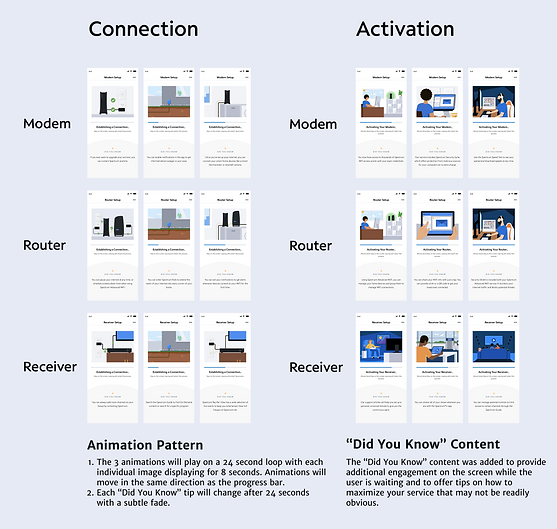
I scheduled a meeting with the Visual Storytelling Team (VST), responsible for Spectrum's illustrations and animations, to discuss the self-install app's connection and activation phases. I shared my goal of creating an engaging, personable animation with varying images, as customers could be waiting for five minutes or more. I emphasized that the connection phase should highlight correct equipment setup to stress its importance, while the activation phase should focus on the activities customers could enjoy with their new services, building excitement.
For this first iteration, I wanted to let the visual storytelling team brainstorm since they are the visual design experts. I explained that each frame of the animation would play for eight seconds and there would be three frames. The animation would be a 24 second loop.
Version 1 of Storyboards

VST provided the first storyboard version for feedback. I chose to share each round of iterations with the product and software engineering teams to gather feedback. Both teams have deep self-install knowledge and offer a variety of perspectives.
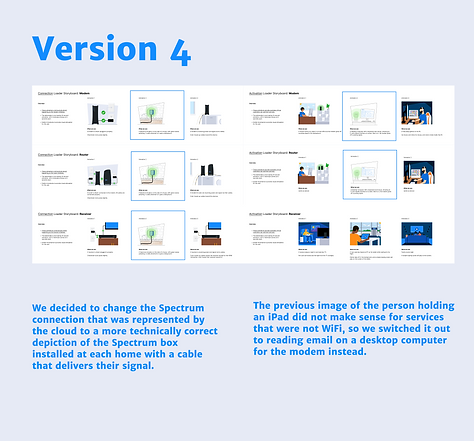
Collectively, we agreed that the first connection frame featuring checkmarks felt out of place and decided it would be better to make the equipment specific to the service being set up. Additionally, we aimed to make the activation phase more lively and engaging.
Version 2 of Storyboards
After the first animation iteration, we felt a more directive request would be beneficial.
Together, the product team created a detailed outline with ideas for connection such as visualizing a Spectrum signal being sent to the home emphasizing the broader signal customers are waiting for. For activation, we introduced charming concepts, like a movie night with popcorn, to create a more engaging and delightful experience.


VST came back with a more detailed phase of drawing that incorporated all of our ideas. The team approved this phase and we began a series of tweaks to the images from this point forward until we reached our final animation version.
Evolution of the Animation Iterations

.png)
.png)
The Final Design
.png)